


Pydroid 3 - IDE for Python 3
4.41.62K Reviews
App Specs
- Version
- Varies with Device
- Updated On
- License
- Free
- Downloads
- 10,000,000+
- Developer
- Lider Soft KZ
- Categories
- Education
- Platform
- Android, iOS
Screenshots
 Analysis by AppCompare
I judge a mobile coding app by a practical question: can I use it to learn, test an idea, or make progress on a real script without turning every small task into a workaround? Pydroid 3 is built for that kind of quick, hands-on Python practice on Android. It is an education app from Lider Soft KZ, and its appeal is less about replacing every desktop tool than about making a Python interpreter available when a computer is not nearby.
That distinction matters before you install it. A phone is useful for trying short examples, reviewing code, and learning by experimentation, but its screen and input methods change how comfortably you can work. I would choose this app if portability and immediate execution matter more than a large workspace. If your work depends on a complex project setup, long editing sessions, or a desktop workflow, I would treat a computer-based environment as the better main tool.
What I would use it for day to day
A realistic use is a student checking a lesson between classes. They can type a small function, run it, change an input, and see whether the result matches their expectation. That feedback loop is valuable because it turns a passive explanation into something testable. I also find the phone format handy for keeping a few short practice scripts close at hand rather than waiting until I can open a laptop.
For a beginner, I would start with compact exercises: string handling, loops, simple calculations, or a small data transformation. On a phone, these are easier to inspect than a sprawling project, and quick runs make it natural to test one change at a time. The included tutorial gives new learners a place to begin, while the interpreter lets them move from reading an idea to trying it themselves.
There is a useful trade-off here: convenience can encourage frequent practice, but it does not make a phone keyboard ideal for every kind of code. I would draft a short script or investigate a bug while away from my desk, then move to a larger screen for substantial refactoring or careful review. That division of labor makes mobile coding feel productive instead of frustrating.
How it fits among Python tools
Compared with learning apps that mainly present lessons and quizzes, this one puts execution at the center. That is a meaningful difference if you learn best by changing code and seeing what happens. Compared with a conventional desktop IDE, though, the phone is naturally a more constrained workspace. Desktop tools are usually the easier choice when a project needs several files open at once or when precise keyboard navigation matters.
I would also separate this from browser-based coding options. A browser can be convenient when you want to work across different devices without making one phone app your main environment, but the experience depends on being comfortable with that workflow and having access to it. Pydroid 3 makes more sense when you want a dedicated Android place to write and run Python locally on the device. Neither approach is universally better; the best choice depends on whether portability, screen space, or a particular project setup is your priority.
Worth Reading Before You Choose

Flipboard Shows What News Apps Must Do Beyond the Feed

Switching to Android Auto Means Rethinking Your Driving Routine

Google Calendar Makes a Crowded Week Easier to Manage

Ludo King Makes the Most of the Minutes Between Plans

Baby Panda World Brings Quick Play to Modern Phones, but Its Game Library Feels Busy

ESPN’s Live Game View Makes Following Close Games Easier
The app is free to install and has optional in-app purchases ranging from under a dollar to around thirty dollars per item. I would begin with the free version and decide whether any paid option solves a specific need rather than paying before I know how it fits my routine. Its Everyone age rating makes the stated content rating broad, but younger learners will still benefit from an adult helping them set realistic goals and understand code they copy.
First Impressions and Interface
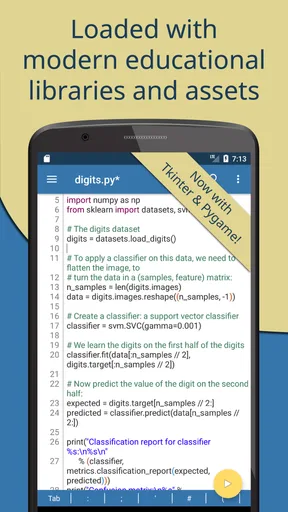
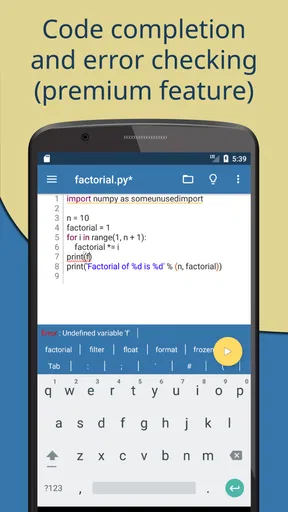
When you first launch the app, you’re greeted with a clean and intuitive interface. The developers have done a tremendous job keeping things simple and user-friendly. Everything feels where it should be, and the learning curve is almost non-existent. The interface is designed to get you right into coding without any unnecessary distractions. It’s like having your favorite desktop IDE, but more compact and accessible.
One of the things I absolutely loved was the dark mode option. Let’s be real, who doesn’t love a good dark mode? It’s easy on the eyes, especially during those late-night coding marathons.
Features Galore
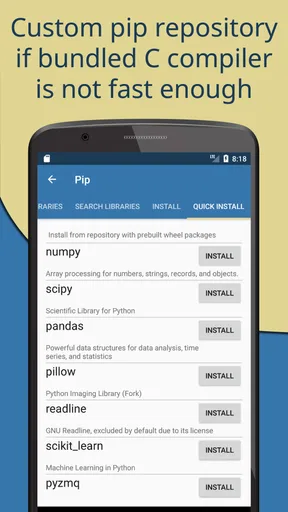
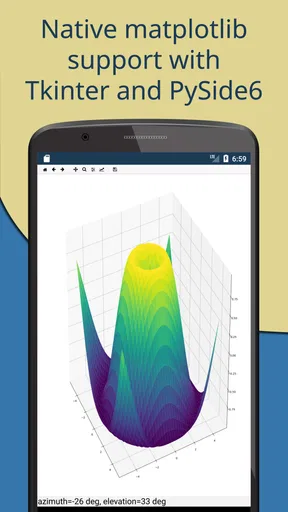
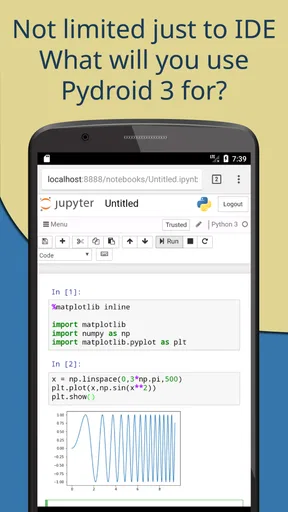
What sets this app apart is its robust set of features. You’re not just getting a basic code editor; you’re getting a powerful Python 3 interpreter. It’s like having a mini-computer in your pocket. You can write, edit, and run scripts with ease. Plus, the app supports various libraries like NumPy, SciPy, and Pandas. So, if you’re working on data analysis or just playing around with some fun math problems, you’re covered.
Another cool feature is the ability to run Pygame. Yes, you heard that right! You can develop games directly from your phone. This is a game-changer for students and hobbyists looking to experiment with game development without needing a full PC setup.
Performance and Usability
Now, let’s talk about performance. I was genuinely surprised by how smoothly the app runs on my device. The code execution is quick, and there’s minimal lag even when handling larger scripts. This efficiency ensures that you remain productive without getting bogged down by technical hiccups.
The app also allows for easy import of scripts via local storage or cloud services. This flexibility is fantastic for those who often switch between devices or need to access their work from different locations. Syncing is seamless, making sure your code is always where you need it.
Learning and Support
For those who are new to Python or coding in general, the app offers a treasure trove of learning resources. It includes a built-in Python tutorial to help newbies get started. It’s a great way to learn the ropes without feeling overwhelmed. Plus, there’s a thriving community and support forums where you can ask questions and share tips.
If you ever find yourself stuck, you’re not alone. The support available through the app’s community is incredibly helpful, making sure that you can troubleshoot effectively and continue learning without major interruptions.
Small habits that make mobile coding easier
I get the most from a phone IDE when I treat each session as a focused experiment. Before opening a script, I decide what I want to test, then keep the change small enough to understand on a narrow screen. If a result is unexpected, I check the input and isolate the relevant lines rather than rewriting everything at once. This approach is useful in any editor, but especially on mobile, where scrolling through a long file can make it easy to lose context.
When moving scripts between devices, I would keep a clear copy in a place I can find again and avoid assuming that importing a file is the same thing as managing a complete project. The app’s local-storage and cloud-service import options are convenient for bringing work in, while a deliberate naming habit helps prevent confusion between practice versions. For anything important, I would also keep a separate backup; a coding workspace should not be the only home for work I cannot afford to lose.
Libraries such as NumPy, SciPy, and Pandas make experimentation more interesting, but I would use them with a clear purpose. A small table calculation or numerical example is a sensible mobile test; a large analysis pipeline is harder to inspect and edit on a phone. The practical win is being able to explore an idea quickly, not pretending every phone session is equivalent to a full data-science workstation.
Where I would draw the line
Although the original experience can feel close to a compact desktop IDE, I would not make that comparison too literally. A phone gives you less room to see code and output together, and typing punctuation-heavy syntax on a touchscreen can slow down careful edits. An external keyboard may make longer sessions more comfortable, but the screen still shapes how much context you can keep in view. For a multi-file application or a project that needs extensive debugging, I would switch to a computer rather than fight the format.
I would also be cautious about expecting a mobile interpreter to behave exactly like every other Python setup. A script that relies on a particular environment, hardware, or external service may need adjustment before it runs as intended. That is not a reason to avoid the app; it is a reason to use it for learning, prototypes, and portable checks, then validate important work in the environment where it will ultimately be used.
For game experiments, Pygame support is an appealing extra, but I would keep the goal modest: test a mechanic, learn how a loop works, or make a small playable sketch. A phone is a convenient place to explore the idea, while a larger display and physical controls are more comfortable for extended game development. The same principle applies to data work: use mobile access to test a concept, not as a promise that every demanding workflow will feel effortless.
Who should install it, and who should choose differently
I would recommend it most to learners who want to run Python code without waiting for a laptop, teachers who need a portable way to demonstrate short examples, and hobbyists who like testing small ideas in spare moments. It is also a sensible companion for someone who already codes elsewhere and wants a lightweight place to inspect or try a script while away from a desk. The app has a 4.3 average from around 83,000 ratings, and it has passed 10 million installs, which suggests that many Android users have found a reason to try it.
I would steer a complete beginner toward it if they are willing to learn by doing and keep early projects small. I would steer someone away from relying on it as their only tool if they need a broad, carefully organized workspace, advanced project coordination, or comfortable editing for hours. Those needs are better served by a desktop IDE or another environment designed around a full keyboard and larger display. Likewise, if your main goal is structured instruction rather than writing and running code, a lesson-first learning app may be a better starting point.
Switching later is manageable if you keep your scripts in ordinary, clearly named files and make a habit of backing them up. The harder part is not moving the code; it is adjusting to a different environment and checking that libraries and assumptions still match. I would use the mobile app to build understanding, then test any project that matters in its intended setup before relying on it.
Final Thoughts
All in all, Pydroid 3 is a phenomenal app that brings the power of Python right to your fingertips. It’s perfect for students, educators, and hobbyists who need a flexible and portable coding solution. The app’s combination of features, performance, and support make it an invaluable tool for anyone interested in coding on the go.
If you’re looking to enhance your coding skills or simply need a reliable on-the-go IDE, give it a try. It’s more than just an app; it’s a gateway to endless possibilities. Happy coding!
Pros
- User-friendly interface for coding on mobile.
- Supports many Python libraries and packages.
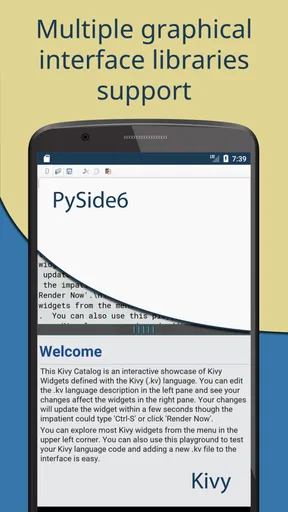
- Integrated PyQt for GUI applications.
- Offline coding without internet required.
- Regular updates enhance features and stability.
Cons
- Limited performance compared to desktop IDEs.
- Some advanced libraries may not be supported.
- In-app purchases for certain features.
- Occasional stability issues on older devices.
- Limited screen space on smaller devices.
FAQs for Pydroid 3 - IDE for Python 3
What are the main features of Pydroid 3?
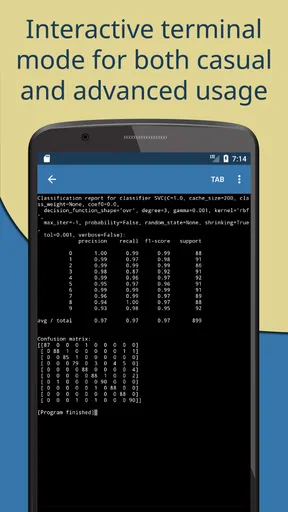
Pydroid 3 is a powerful IDE for Python 3 on Android, offering features such as an offline interpreter, PIP support for installing libraries, a built-in C, C++, and Fortran compiler, and a terminal emulator. It also includes support for scientific libraries like NumPy and SciPy, making it versatile for both beginners and advanced users.
Is Pydroid 3 suitable for beginners in Python programming?
Yes, Pydroid 3 is designed to be user-friendly, making it a great choice for beginners. It offers an intuitive interface, comprehensive documentation, and a wide range of tutorials to help newcomers understand Python programming. The app provides an excellent environment to learn and practice coding on the go.
Can I use Pydroid 3 without an internet connection?
Absolutely. One of the standout features of Pydroid 3 is its offline interpreter, which allows you to code and run Python scripts without needing an internet connection. This makes it highly convenient for users who want to work in environments where connectivity is limited or unavailable.
What are the limitations of Pydroid 3?
While Pydroid 3 offers extensive features, it does have some limitations. The app might not support certain libraries that require specific system configurations or hardware. Additionally, due to the limitations of mobile devices, performance might not match that of a desktop IDE, especially for resource-intensive tasks.
How do I install additional libraries in Pydroid 3?
Pydroid 3 includes a PIP package manager, allowing you to install additional Python libraries directly from the app. You can use the terminal to run standard PIP commands and manage your libraries, providing flexibility to customize your development environment according to your project needs.


